
- Features
- Products & inventory
Inventory management with stock per branch: Clear stock in every branch, and a record of every move.
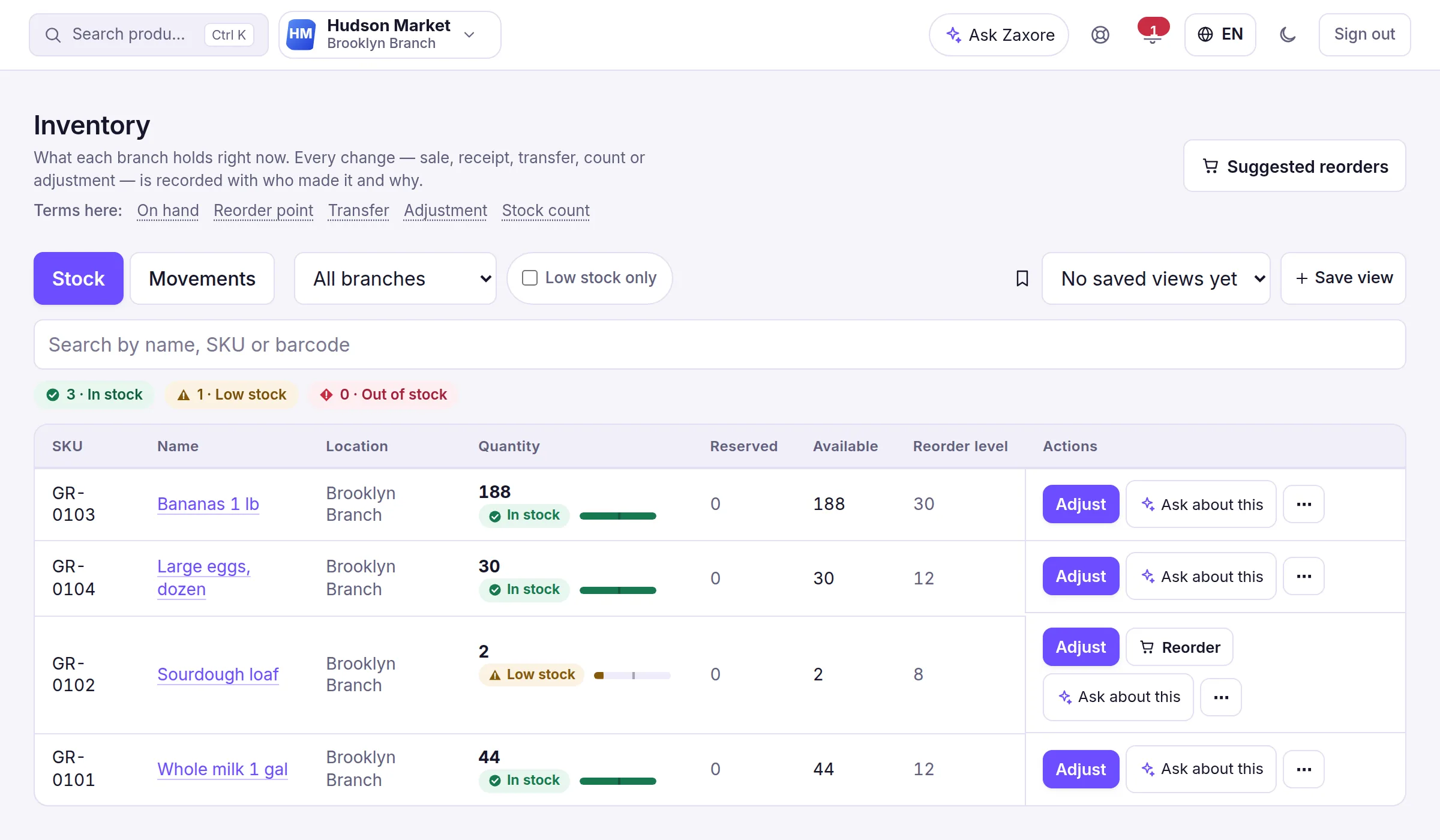
Keep one catalogue with barcodes, categories, prices, tax, photos and variants. Each branch shows what is on hand, what online orders have reserved and what is free to sell. Sales, deliveries, transfers, adjustments and counts each leave an entry in the stock history, with who made it and why.
What you can do
- SKU, barcode (unique per company), categories, brands, units, tax rateLive
- Variants with their own SKU, barcode, price and stock (choosing a variant at the register is planned); barcode labelsLive
- Several photos per product by drag-and-drop or phone camera, with a main photo — shown on the Products screen, the online ordering page and the register’s product tiles (not on receipts)Live
- Category, logo, store and reward images with croppingLive
- Stock per branch: on hand, reserved, available; reorder alertsLive
- Adjustments with reasons; stock counts from a phone by scanning, with blind counts and a second person’s approvalLive
- Transfers between branches, tracked in transit (Growth or Business plan)Live
- Lots and expiry dates, sold earliest-expiring first, and serial numbers (Growth or Business plan, switched on in setup)Live
- Cost and profit visible only with the cost permissionLive
One product, one record — from the shelf to the branch
Pick a product: the picture the customer sees, the catalog record your team keeps and the stock in each branch are the same record in Zaxore.
In the storeWhat the customer sees
 House blend beans 12 oz$17.50+ Add
In the catalogWhat your team keeps

- SKU
- BN-1200
- Barcode
- 850012340034
- Category
- Coffee
- Price
- $17.50
- Cost
- by permission
In each branchOn hand, reserved, available
- New York BranchIn stock
- On hand
- 8
- Reserved
- 0
- Available
- 8
- Los Angeles BranchLow
- On hand
- 2
- Reserved
- 0
- Available
- 2
Reserved = units held for online orders that are not collected yet.
In the app
Screens captured from the Zaxore app on sample data; names that belong to real businesses are hidden.
Source and capture details
- Source
- The app run locally, synthetic sample data
- App release
- 92c0c3a
- Captured
- 2026-10-16
- Edits
- Navigation sidebar cropped out. Nothing hidden or retouched.
Who uses it
Inventory clerks receive, adjust and count; managers approve; cashiers only see availability.
How it connects
Low stock feeds purchasing; reserved units come from online orders; valuation feeds reports.
From the help center
How do I track inventory and customers?
Inventory shows on-hand, reserved and available per branch with a full movement history; Customers keeps profiles, balances, statements and loyalty points.
How do I add products and start selling?
Create products with SKU, barcode, price and initial stock, then open a shift at the register, scan or search, and take payment.
Guides
How to choose a POS system for your small business
A practical checklist for choosing a POS system: the counter, stock per branch, loyalty, staff roles, reports, devices, internet and contract questions.
Multi-location inventory management: a practical guide
How to manage inventory across multiple stores: stock per branch, one catalogue, recorded transfers, reorder levels, cycle counts and a weekly routine.
QR code ordering for restaurants: pickup orders without a queue
How to run QR pickup orders: one link per branch, an in-stock menu, realistic time slots, cutoffs, drive-thru, clear statuses and payment at pickup.
All features
Companies & branches
One account for all your companies and branches, with each person working in the branch they run.
Headquarters for groups
A holding company on top and each subsidiary with its own figures, in its own currency — one tap to open any of them.
Partner portal
Profit-share partners see their own approved statements and the payments recorded for them — nothing else.
Sales & point of sale
Scan, take cash, card or both, and close the shift with the drawer counted. Exceptions go to a manager.